HTML to PDF in Node.js without Puppeteer or Chromium
Puppeteer is good software. Playwright is good software. Chromium is a good browser.
The problem starts when a document pipeline quietly becomes a browser operations problem. You want to turn an invoice template into a PDF. Now your deploy has to think about browser downloads, system libraries, launch behavior, container size, cold starts, process cleanup, and memory under concurrency.
That trade-off can be worth it when the input is really a web page. It feels stranger when the input is controlled document HTML: invoices, receipts, statements, boletos, reports, notices. These templates usually come from your own code. They do not need JavaScript execution. They need pagination, fonts, images, page numbers, selectable text, and predictable failure when the template leaves the supported shape.
That is the reason Vellora exists.
The comparison below comes from the current visual-fidelity artifacts for invoice page 1: Vellora's native path, Vellora's optional Chromium path, and the generated pixel-diff map.
| Vellora native | Vellora Chromium | Difference map |
|---|---|---|
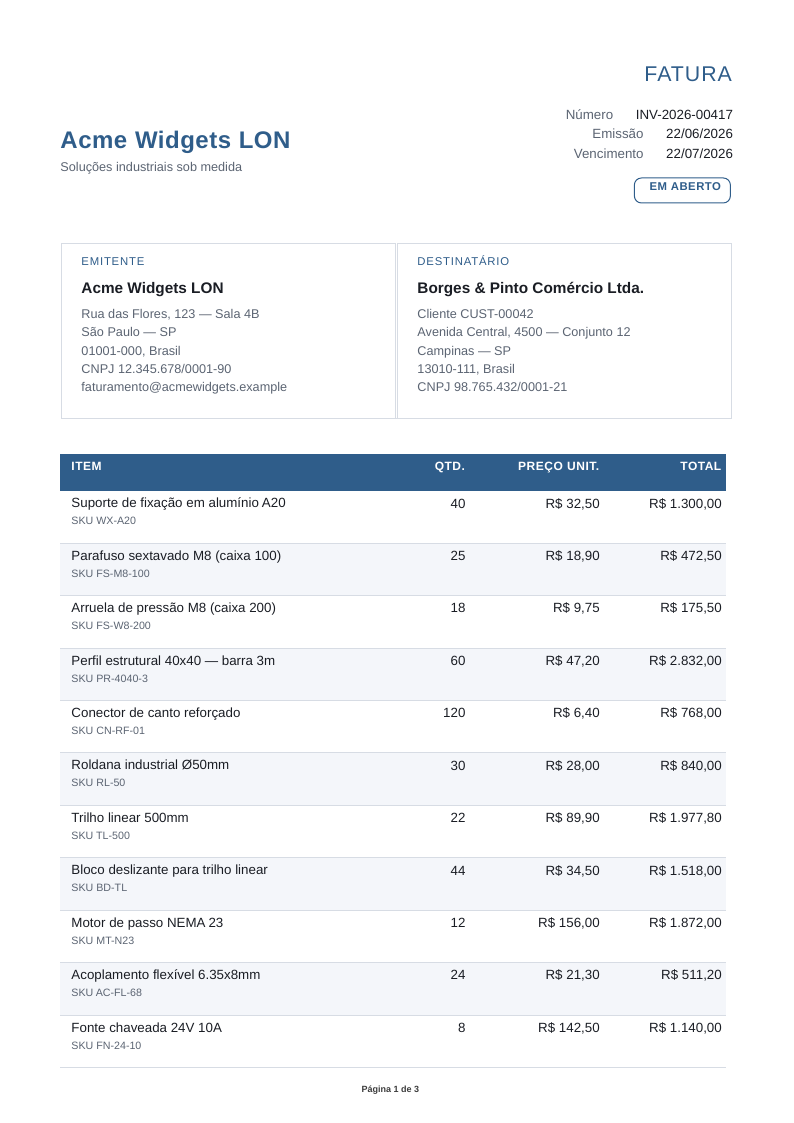 | 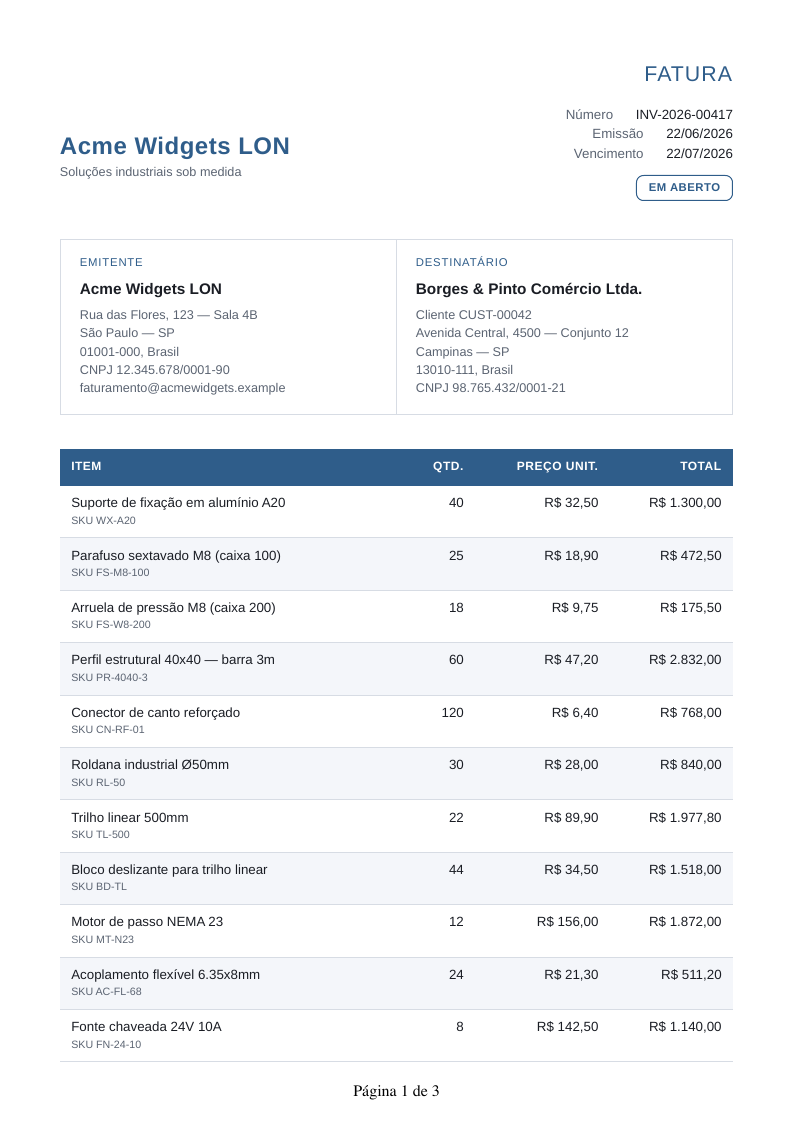 | 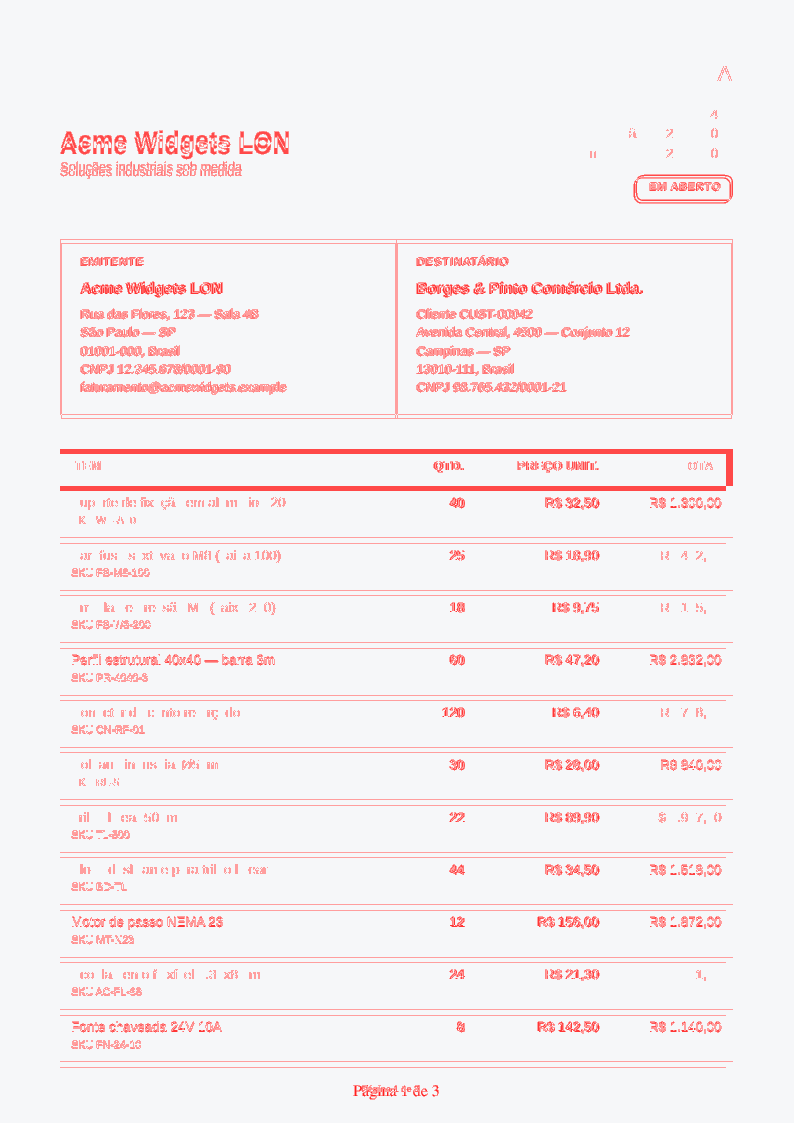 |
For this artifact, the manifest reports matching page dimensions at 794 x 1123 px, 64,988 mismatch pixels (7.29%), and a mean absolute error of 0.0241 against the Chromium reference. That is not a universal quality score. It is a concrete artifact from the repository's visual-fidelity harness, and the diff image is there to make the differences inspectable.
Vellora is an HTML-to-PDF renderer for Node.js with a native, in-process default path. The default package does not install Puppeteer, Playwright, Chromium, wkhtmltopdf, Python, Java, or a sidecar service. You pass generated document HTML and data to renderPdf, and you get PDF bytes back from the same Node process.
Under the hood, the native path is a Rust renderer exposed to Node.js through a napi-rs addon. The public API stays JavaScript; the rendering work does not require launching a browser process.
If you already render HTML with your own templating stack, you can pass that final HTML directly. The data argument is optional; Vellora's built-in templating is there when you want the document renderer and template binding in the same package.
npm install velloraimport { writeFileSync } from "node:fs";
import { renderPdf } from "vellora";
const html = `<!doctype html>
<html>
<head>
<style>
@page { size: A4; margin: 18mm; }
body { font-family: sans-serif; }
</style>
</head>
<body>
<h1>Invoice {{ invoiceNumber }}</h1>
<p>Total: {{ total | currency("USD") }}</p>
</body>
</html>`;
const pdf = await renderPdf(html, {
invoiceNumber: "INV-2026-00417",
total: 129,
});
writeFileSync("invoice.pdf", pdf);Why not just use Puppeteer?
Sometimes you should.
If your template depends on JavaScript, arbitrary website CSS, browser layout quirks, or exact Chromium print output, a browser renderer is the honest tool. Vellora is not trying to be a browser clone.
The native path is for a narrower case: generated documents whose markup you control. That narrower case is still large. Billing, finance, logistics, healthcare, legal operations, and internal tools all produce document HTML that looks much more like a print template than like a live web app.
For that kind of input, carrying a full browser through every runtime can be unnecessary weight.
What changes when the renderer is native?
The main change is where the contract lives.
A browser renderer accepts the web platform and tries to print whatever page you give it. Vellora starts from the opposite side. It defines a documented HTML/CSS subset for generated documents and rejects unsupported input in strict mode instead of silently producing a wrong PDF.
That can feel less magical. It is also easier to reason about.
- The default path launches no browser process.
- The renderer validates the template against the documented compatibility table.
- Optional built-in templating handles interpolation, loops, conditionals, and formatting helpers.
- Document features such as
@page, page counters, repeated table headers, images, custom fonts, and PDF/A-2b are part of the current shipped surface. - If a template needs browser print fidelity, you can route that template through the optional Chromium engine instead of moving every document onto the browser path.
The point is not "browser bad, native good." The point is choosing the smallest renderer that matches the document.
What the current data says
The repository has a pinned resource benchmark run for the native path and Vellora's optional Chromium path. This is a snapshot from CI, not a universal promise for every host or template. It is useful because it keeps the discussion concrete.
Source: Resource Benchmarks run 28302742627 on pinned Linux CI, Node v22.23.0, 4 cores.
The benchmark separates package footprint from external runtime. Fresh install measures the npm package footprint, which is why the native and Chromium package installs look almost identical. The browser cost shows up separately: the Chromium path needs a 412.28 MB external runtime that the native path does not carry.
Memory is split the same way. The native path runs in-process, so its relevant number is RSS inside Node. The Chromium path runs browser work out-of-process, so the relevant number is external RSS.
| Path | Fresh install | External runtime | RSS @8 | External RSS @8 | Warm median / p95 |
|---|---|---|---|---|---|
Native vellora | 28.93 MB | N/A | 116.51 MB | N/A | 17.47 / 17.96 ms |
| Vellora Chromium | 28.94 MB | 412.28 MB | N/A | 6425.81 MB | 491.85 / 509.43 ms |
At concurrency 8, the native path reported 116.51 MB RSS inside the Node process. The Chromium path reported 6425.81 MB across external browser processes. Warm latency showed the same shape: 17.47 / 17.96 ms median/p95 for native, versus 491.85 / 509.43 ms for Vellora Chromium.
The same evidence bundle includes native-vs-Chromium visual artifacts for representative fixtures: visual report and manifest. Puppeteer and Playwright are measured in that benchmark artifact, but this article does not quote them as comparable because the run marked them non-comparable for the fixture: their output had 1 page while the reference had 3. Timing a one-page output against a three-page reference would make the comparison look cleaner than it is.
Where Vellora fits
Use the native path when the template is generated by your application and can stay inside Vellora's document subset:
- invoices with repeated table headers
- receipts and point-of-sale summaries
- statements and account reports
- boletos and payment notices
- legal or operational notifications
- internal reports that need deterministic PDF output
The sweet spot is not arbitrary HTML. It is document HTML.
Where this breaks
Vellora's native renderer does not execute scripts. It does not fetch remote assets from inside the document. It does not promise full CSS grid/flex/browser parity. It is strict by default because a financial document that renders "almost right" can be worse than a document that fails loudly.
If your acceptance criterion is "matches my current Puppeteer PDF exactly," keep that browser output as a reference and compare it before switching. The migration guide walks through that process, including how to keep Chromium available only for templates that actually need it.
How to try it
Start with the getting started guide. It renders a first PDF from Node.js and explains what renderPdf expects.
Then check the compatibility reference before moving a real template. If your template needs images or fonts, the images and fonts guides show the explicit byte-based APIs. If you are migrating from Puppeteer or wkhtmltopdf, read Switching from wkhtmltopdf / Puppeteer before deleting your old path.
The package is on npm, and the source is on GitHub. If you have a document template that should fit this model and does not, open an issue with the smallest representative case. That is the most useful feedback this project can get.